What if you could navigate through real star systems, fly past confirmed exoplanet hosts, and zoom out to see the large-scale structure of the cosmic web — all from a browser tab? That is exactly what 3D Star Maps makes possible. Built with Three.js and powered by real astronomical data from NASA and the HYG catalogue, this open-source interactive 3D star map brings the universe to your screen in a way no flat chart ever could.
In this post, we will explore how 3D Star Maps works, the real-world data behind every glowing point of light, and why this kind of web-based visualization matters — both for developers and for anyone who has ever looked up at the night sky and wondered.
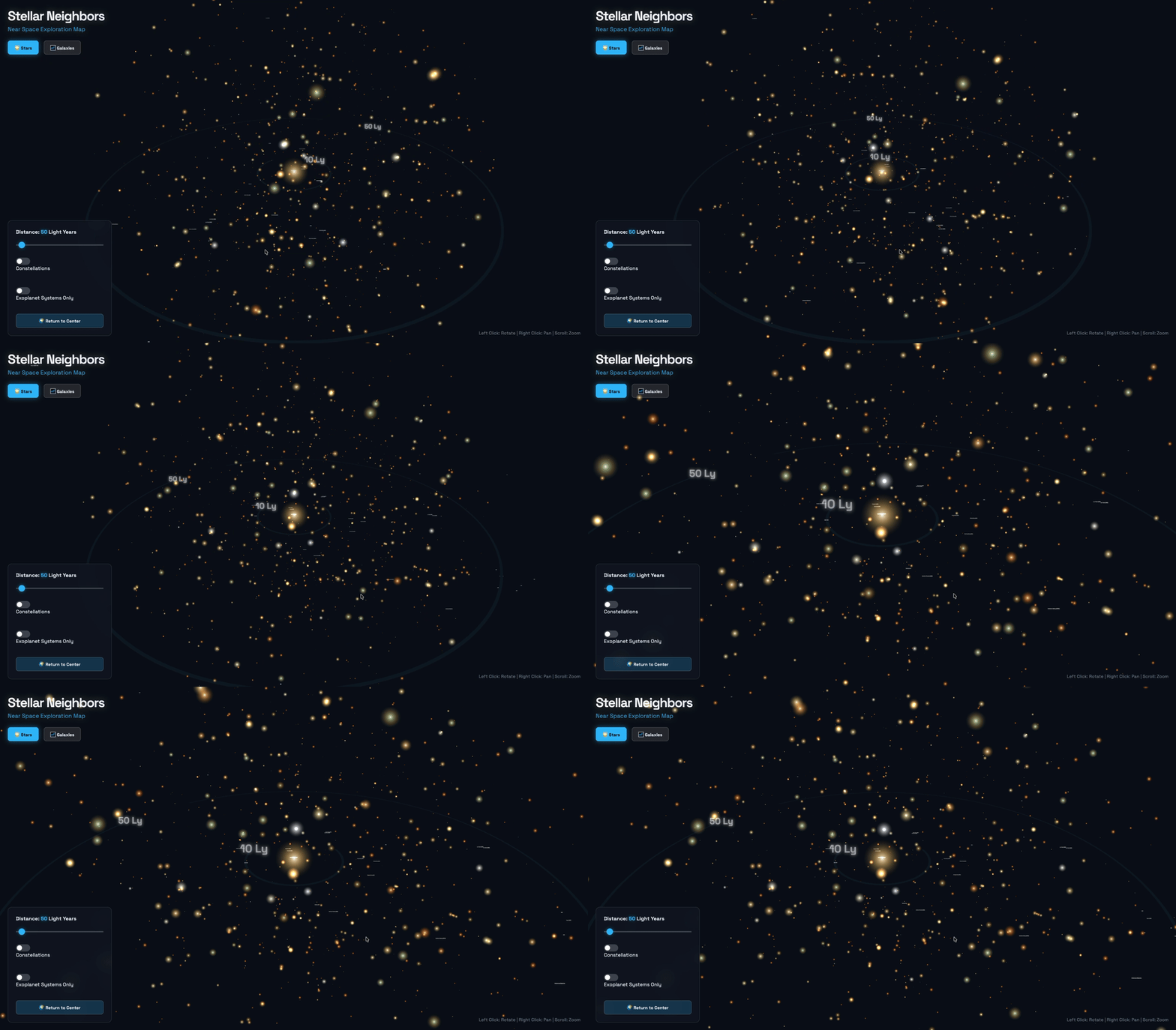
Table of Contents
- What Is 3D Star Maps?
- The Data Behind the Stars: NASA & HYG Databases
- How It Works: Three.js and WebGL Under the Hood
- Key Features of the Visualization
- Why Open Source? What Developers Can Learn
- The Growing Universe of Astronomy Web Apps
- Conclusion
- FAQ
What Is 3D Star Maps?
3D Star Maps is an immersive, interactive visualization of the stellar neighborhood and cosmic web, built entirely for the browser. Instead of the usual flat sky charts or static planetarium images, it places you inside a navigable 3D scene where every star, exoplanet system, and distant galaxy occupies its real position in space.
The project is publicly available on GitHub at github.com/alparslantopbas/3d-star-maps. It is written in JavaScript (80.1%), CSS (13.3%), and HTML (6.6%), and it runs directly in any modern browser with no installation required. For more developer projects like this one, visit the Topar Solutions blog.
The target audience is broad: curious space enthusiasts who want to explore beyond a flat night-sky map, developers looking for a real-world Three.js project to study, and anyone who wants to understand the three-dimensional shape of our cosmic neighborhood rather than its two-dimensional projection. As an interactive 3D star map, it serves both aesthetic and educational purposes equally well.
The Data Behind the Stars: NASA & HYG Databases
One of the things that makes 3D Star Maps stand out from a generic WebGL starfield is that its stars are real. Each point of light corresponds to an actual catalogued object.
The project draws on two primary datasets. The first is the HYG Database, a merged catalogue combining data from three foundational sources: the Hipparcos space mission catalogue (over 118,000 stars with precise parallax measurements), the Yale Bright Star Catalogue, and the Gliese Catalogue of nearby stars. Together, these sources give each star its accurate 3D position in parsecs, spectral type, and luminosity — the raw ingredients of a scientifically grounded visualization.
The second source is the NASA Exoplanet Archive, which as of April 2026 catalogs 6,273 confirmed exoplanets. By overlaying exoplanet host stars onto the stellar map, 3D Star Maps allows users to see exactly which nearby stars are known to harbour planetary systems — a detail that transforms a beautiful visual into a genuinely informative scientific tool.
Using real positional data rather than procedurally generated noise means the cosmic distances are accurate. Alpha Centauri is where it should be. Proxima Centauri is just slightly closer. The visualization is not just pretty — it is correct.
How It Works: Three.js and WebGL Under the Hood
Rendering thousands of individually positioned 3D objects in a browser at smooth frame rates is a non-trivial engineering challenge. This is where Three.js earns its place as the project's core technology.
Three.js is a mature, well-documented JavaScript library built on top of the WebGL API. It abstracts the complexity of shader programs, GPU buffer management, and the rendering pipeline into a clean, developer-friendly interface. For a project like 3D Star Maps — where the scene can contain tens of thousands of stars — the library's performance tooling is essential.
The key optimization technique is InstancedMesh. Instead of creating a separate draw call for every single star (which would bring even a powerful GPU to its knees), InstancedMesh allows the renderer to submit one draw call that stamps out thousands of instances of the same geometry, each at a different position, scale, and color. Real-world benchmarks show this technique can cut draw calls from 980 down to just 142, reducing memory usage by 38% in the process.
For distant stars and objects, Level of Detail (LOD) rendering switches from 3D sphere geometry to simple point sprites, preserving visual fidelity where it matters while keeping the GPU load manageable. The target is a consistent 60fps — the threshold at which motion feels truly smooth and navigation feels intuitive rather than sluggish.
GPU-accelerated rendering pipelines built this way have been shown to boost frame rates by up to 85% compared to naive implementations, according to WebGL benchmark testing.
Key Features of the Visualization
3D Star Maps is more than a screensaver. Its features are designed to make the data explorable, not just viewable.
Stellar Neighborhood Exploration places you at the center of a scaled 3D map of nearby stars. You can orbit, zoom, and pan freely, watching the parallax shift of foreground stars against the deeper background — the same phenomenon astronomers use to measure stellar distances.
Exoplanet System Highlights mark the host stars of confirmed planetary systems with distinct visual indicators. With over 6,000 confirmed exoplanets in the NASA archive, a significant fraction of the nearby stars in the map have worlds orbiting them, and the visualization makes this tangible.
Distant Galaxies and the Cosmic Web extend the view beyond the stellar neighborhood into the large-scale structure of the universe. The cosmic web — the filamentary network of matter connecting galaxy clusters across hundreds of millions of light years — gives the visualization a sense of scale that no single star map can convey.
Interactive Navigation is mouse-and-touch driven. Click and drag to rotate. Scroll to zoom. The camera movement is smooth and physically intuitive, making the experience accessible to non-technical users while still rewarding developers who want to dig into the underlying scene graph. This is what sets a well-built interactive 3D star map apart from a static image: the freedom to explore at your own pace, in any direction.
Why Open Source? What Developers Can Learn
Publishing 3D Star Maps as an open-source project on GitHub is a deliberate choice with real educational value.
For developers exploring Three.js, this is a working, non-trivial example of a real-world WebGL application. It demonstrates how to load and parse large external datasets, how to structure a scene with thousands of objects without sacrificing performance, and how to build camera controls that feel natural. These are patterns that textbook tutorials rarely cover but that production applications demand.
The intersection of astronomy and web technology is also a genuinely underexplored space. Most astronomical tools are either desktop applications or static images. A browser-based 3D visualization that uses real data proves that the web platform is more than capable of handling serious scientific visualization — and it invites contributors who care about both domains.
Anyone interested in contributing can clone the repository at github.com/alparslantopbas/3d-star-maps, explore the codebase, and open a pull request. Whether the contribution is a new data layer, a performance improvement, or a UI enhancement, the project benefits from fresh perspectives.
The Growing Universe of Astronomy Web Apps
3D Star Maps arrives at an interesting moment for astronomy software. The global astronomy apps market was valued at approximately $450 million in 2023 and is projected to reach $1.2 billion by 2033, growing at a CAGR of 10.3% (Data Horizzon Research). The AR stargazing segment alone reached $1.12 billion in 2024 and is forecast to grow to $5.17 billion by 2033 at a 17.4% CAGR.
This growth is driven by three converging trends: increasing smartphone and browser capability, a surge of public interest in space exploration (fueled by programs like Artemis and commercial spaceflight), and the maturation of 3D web technologies like WebGL, WebGPU, and libraries like Three.js.
Most existing tools in this space — Stellarium, Sky Map, Star Walk — are polished consumer products focused on "what is in the sky tonight." 3D Star Maps occupies a different niche: it is a developer's tool, a data visualization, and a spatial exploration environment. It is less about identifying tonight's constellations and more about understanding the three-dimensional structure of the universe we inhabit.
As WebGPU adoption grows and browser rendering capabilities improve, web-based astronomical visualizations like this one will only become more powerful. An interactive 3D star map built on open data and open-source code is a glimpse of where this entire category is heading — and 3D Star Maps is already there.
Conclusion
3D Star Maps demonstrates what becomes possible when real scientific data meets modern web rendering technology. By combining the HYG star catalogue and NASA's exoplanet archive with Three.js's GPU-accelerated rendering pipeline, it produces an interactive 3D star map that is both visually stunning and scientifically accurate.
For developers, it is a practical reference for building high-performance WebGL scenes with thousands of objects. For space enthusiasts, it is a new way to perceive the universe — not as a flat ceiling of lights, but as a three-dimensional neighborhood you can navigate. And for the open-source community, it is an invitation to contribute to something that sits at the intersection of art, science, and engineering.
Explore the project on GitHub: github.com/alparslantopbas/3d-star-maps. And for more projects at the frontier of web technology and data visualization, visit topar-solutions.com.
FAQ
What data does 3D Star Maps use?
The project uses the HYG star database (combining Hipparcos, Yale, and Gliese catalogues) and NASA Exoplanet Archive data to render real stars, exoplanet systems, and distant galaxies. Every point of light in the visualization corresponds to a real catalogued object.
Is 3D Star Maps free and open source?
Yes, 3D Star Maps is fully open source and available on GitHub. Anyone can clone, explore, and contribute to the project with no licensing restrictions.
What technology powers 3D Star Maps?
The project is built primarily in JavaScript (80%), using Three.js and WebGL for all 3D rendering. CSS handles styling and HTML provides the page structure. No external frameworks or heavy dependencies are required beyond Three.js itself.
Can I run 3D Star Maps in my browser without installing anything?
Yes. Since it is a web application, you can explore the visualization directly in any modern browser — no downloads, plugins, or accounts required.
How does Three.js handle thousands of stars without slowing down?
Three.js uses InstancedMesh to submit a single draw call for thousands of star objects instead of one per star, cutting draw calls by up to 86% in real benchmarks. Combined with Level of Detail (LOD) rendering and buffer geometry optimizations, the scene maintains a target of 60fps even on mid-range hardware.